Showing posts with label sentence-builders. Show all posts

Saturday, 17 January 2026

Flippity Randomisers

I have to admit that I use Flippity Randomiser a fair bit in my lessons.  I've been using it for different purposes.  

For example:


With this Randomiser, I generate sentences for the children to translate into English.  They use their sentence builders for support if necessary.  If the children have their own devices, they can have the link to generate sentences to help their partner to practise.

This week my Year 5s and Year 6s (age 9-11, mixed age curriculum) have enjoyed an activity using this Randomiser:


We were just starting to create short sentences using En mi pueblo hay / no hay.  I asked the children to write a sentence using their sentence builder.  There were a possible 16 sentences to choose from.  Then I rolled an English sentence using the Randomiser, and the children had to check to see if it generated the same sentence as theirs but in translation.  If they got the same sentence, I asked them to tell me their original Spanish sentence so that we could all hear the translation.  A very simple activity, but they enjoyed it!

A third way I've used the Randomisers is to check sentences for errors.

I use this one with Year 5 and Year 6 to practise adjectival agreement.  We roll a sentence, and then the children consult their sentence builders.  They check to see if the sentence is correct.  If it isn't, they have to work out the corrections that are needed.  As we work out the corrections, we nudge the rolls around so that the sentence reads correctly.  At this point, I just want the children to practise using their sentence builders, practise reading along one horizontal line to get a correct sentence, and look carefully at the spelling of the adjectives.

How do you use Flippity Randomisers?

Are there any other Flippity tools that you enjoy using?


Monday, 30 October 2023

Sentence Builder Bingo


I'm always on the lookout for more ways to drill and practise vocabulary and structures.  During the summer holiday I had the idea of using sentence builders to play bingo with.

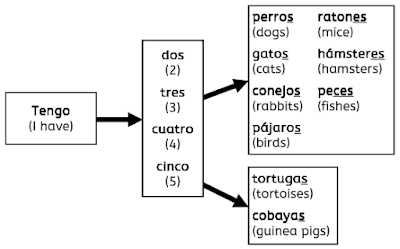
One unit of learning that I have used it with is Pets, in particular saying that you have more than one pet.  I used the bottom half of this sentence builder:


and drew up the above grid as my checklist so that I knew which sentences I had said.

Altogether with this sentence builder it's possible to make 36 sentences.  I asked Year 4 to choose 5 sentences and write them in their books.  Then I read out the sentences one by one in a random order.  I repeated each one twice, just in case, and then went straight on to the next one.  The children needed to listen carefully and constantly check their sentences, ticking off any sentences they had that I said.  When they had ticked off all 5 of their sentences they had to call out "Bingo" and then to check I asked them to read their sentences back to me.  I used my grid to check they were right.

We then continued until most children had heard their sentences.  Some children were frustrated at the end because they had missed one of their sentences and so didn't get bingo.  I did point out, though, that they had heard and identified 4 out of their 5 sentences, so not to get hung up on just one.

The classes that I tried this with said that they enjoyed it.  I liked it because they got to hear over 60 sentences all in one go.  

You may well have been playing this game for ages!  I don't remember having heard it from anyone else.

Thursday, 2 September 2021

Sentencify.net


Yesterday I was browsing posts on the Secondary MFL Matters Facebook group, and saw a reference to the website sentencify.net, which can be used to generate sentences and retrieval activities from a sentence builder.  (Thanks Marissa!)

I've had a play with it this morning (up early as daughter #1 had an early shift at work!) to see what it does.

First of all, you click on the "Get started" button, and this takes you to your "sentence builder" grid.  I entered some simple pets sentences:


There are 10 boxes altogether to structure your sentences.  The next step is to click the "Generate sentences" button, and choose how many sentences you'd like sentencify to generate for you.  I chose 8.


Then you need to type in the English (L2) for the sentences generated.  The sentencify user guide suggests copying and pasting into an online translator as a short cut - I pasted mine into Google Translate (ssshhhh!) and then just had to change turtle to tortoise.

Once you have your sentences in the L1 and L2, click on "Generate activities" for the options for the retrieval activities.

The first is the Match Up:

The activity is designed to be completed online, but it would also be possible to copy and paste into your paper-based activity or PowerPoint.

The second activity is "Unjumble":

The original L1 sentences are jumbled up and students have to rewrite them in the correct order.  It's worth noting here that the program wants the sentences to have the format of the singular pet followed by the plural pets, but grammatically speaking the order could also be the reverse of that.  This is something that you may want to consider when designing your sentences, especially if you are going to ask students to complete them online.

The third activity is "Fill the gaps":

and the fourth is "Translate":


The final activity is "Drag and drop":

To be honest I'm not entirely sure of the aim of this activity.  Each one I generate turns out in a different format!  If you have used the drag and drop, it'd be great if you could say in the comments how you've used it.

At the top of the screen there is also a "Create a test" button.  You can generate a test where students have to translate either L1 sentences to L2, or L2 to L1.  

Once you have finished your sentence builder and sentences, it's possible to save them, but remember to copy the code that is generated for your activity, as you'll need to enter this to open it again.

There is also a function for entering impossible sentences into the sentence builder and using hashtags to clarify which words can go together:
I had a go with this, and it takes a bit of trial and error to get enough variation in the sentences:


Finally, it's also possible to put emojis into your sentences.  I saw this on the sentencify Twitter account.  I didn't know before that pressing the Windows logo key and the full stop together brings up an emoji menu!
The resulting "sentences" will be more useful for some of the activities than for others.

I enjoyed exploring the site and can see how it will be useful in particular for generating quickly and easily lots of sentences from a sentence builder, as well as retrieval activities.  Have a play and see what you think!

Sunday, 13 June 2021

Let's play darts!


This morning I took part in #ShareStuffSunday on Twitter, offering minibooks, making a flag and the LiPS Listening Project.

I had a look through the other tweets, and was very interested in this one from the multi-talented Jasmine Kay (have a look at her Etsy shop!)


I could see straightaway that this was something that could be easily adapted to use in the Languages classroom.  Indeed, Jasmine says that she has used this activity in her French teaching.  I can see it being used for things that need drilling, in other words for phrases or sentences which are repetitive in structure.  It could be another activity to do using sentence builders.

I like how the completed dartboard will provide quick feedback to the teacher as to how many questions each child has got right, and children will like it as it involves colouring in!

For differentiation purposes, children could try to complete the questions without support, and could look at their books, wall displays or knowledge organisers for support.

Thinking about what my classes are doing at the moment, I've made a example of the dartboard activity for my Year 4 unit ¿Tienes hambre?


For further feedback for the teacher, I've used four different levels for the questions, and use a quarter of the dartboard for each level:

Level 1: 1, 18, 4, 13, 6
Level 2: 10, 15, 2, 17, 3
Level 3: 19, 7, 16, 8, 11
Level 4: 14, 9, 12, 5, 20

It should be easy to see at a glance which quarter and therefore which levels children have coped well with.

Monday, 19 April 2021

Things to do with sentence builders in the primary languages classroom: part 2!


In my last post, I talked about some of the activities that I do in the primary languages classroom with sentence builders, and asked readers if they have any primary-friendly activities that they recommend.

I'll be starting my planning for the week shortly (at the top of this post is one of the sentence builders I'm going to be using this week, with Year 5) and so will be looking to incorporate some of the activities that people have recommended:


And some others, from the Facebook group and blog comments:

  • Trapdoor 
  • Slalom listening - You give them a copy of the sentence builder and they highlight/ underline words they hear, then they have to read the whole sentence.
  • Flippity 'fruit machine' style activity, particularly the fact that sometimes there are 'nonsense sentences appearing (with food likes and with clothes you wear in specific weather conditions.
  • Pyramid translation
  • Delayed repetition or writing

Many thanks to everyone who took the time to respond.

Tuesday, 13 April 2021

Things to do with sentence builders in the primary languages classroom


Writing frames, sentence builders, whatever you call them, are enjoying considerable popularity in the languages community at the moment, due mainly to the work of Gianfranco Conti.  If you are a tweeter or if you are in one of the languages Facebook group, you'll have seen lots of posts about them and ideas for using them.

You can see at the top of this post one of the sentence builders that I have been using most recently.  I nearly always use the flowchart format (thanks Joe!) in primary, as I find with the tabular format it's too easy for them to miss columns out.  I also make them in black and white, as colour photocopying is only for special occasions at my schools!  If it's not clear enough without colour, it's not clear enough, I think.

I've been experimenting with using them and knowledge organisers this academic year to facilitate our work in class at a time when I have to stay at the front and not go to help individual children.

We have been trying out different activities with them, for example (in no particular order):

  • I say the Spanish sentence, children tell me the English
  • I say an English sentence, children tell me what it would be in Spanish
  • Children test each other in one of the above two ways 
  • I say a Spanish sentence, but leave it incomplete, either just saying the first sound of the last word or stopping at a suitable place, and children need to complete the sentence with the correct word or with suitable words.
  • After a little practice, I show a sentence from the sentence builder with a random extra word in it.  The children have to tell me which word is unnecessary.
  • I say a sentence in English and the children write it in Spanish on their mini whiteboards and hold it up for me to see.
  • I write a sentence from the sentence builder on my mini whiteboard, and the class between them have 10 attempts to guess the sentence, which I then reveal after the 10 attempts or when it is guessed correctly.
  • I prepare a sentence from the sentence builder and conceal it.  The children all prepare a sentence and write it on their mini whiteboards.  The children stand up.  I reveal my sentence word by word.  As soon as the children have a word in their sentence that is different to mine, they have to sit down, until we reach the end of the sentence and hopefully there is someone left who has the same sentence as me.  Thanks to Sue Cave for this idea - Year 3 loved it this morning, although one of the boys saw through my strategy of not wanting to repeat words!
Do you have any favourite activities when using sentence builders?  There are some that I have seen that are a bit reading-heavy for primary children; I'd love to increase my repertoire!  Please leave any ideas in the comments.